Customer 360
One page per customer: lifetime value, average order value, order history, and a timeline of what they did on your store.
Features
Ezzeefy is one app covering analytics, marketing, personalization and checkout rules. Where something requires setup or a particular Shopify plan, it says so here rather than after you install. The docs explain how each piece works.
web pixel
Storefront activity and Shopify records land in one place, so a customer is a timeline rather than a row in an export.
One page per customer: lifetime value, average order value, order history, and a timeline of what they did on your store.
Every customer gets a lifecycle stage, a churn risk, a predicted lifetime value and a likelihood to buy again. Calculated with published formulas on your own data — no model, nothing sent anywhere.
Requires: Recalculated daily, not live
Ready-made groups like at-risk, loyal and lapsed, with live counts. Turn one into a segment in a click.
Visitors, pageviews and purchases from the last hour as they happen.
Requires: Shopper analytics consent, so coverage is partial in the EU and California
Orders, products, customers, marketing and discounts, with trends over any period and CSV export.
personalization engine
Target content on who someone is and what they have done, on any section of your existing theme. No developer, no separate page builder.
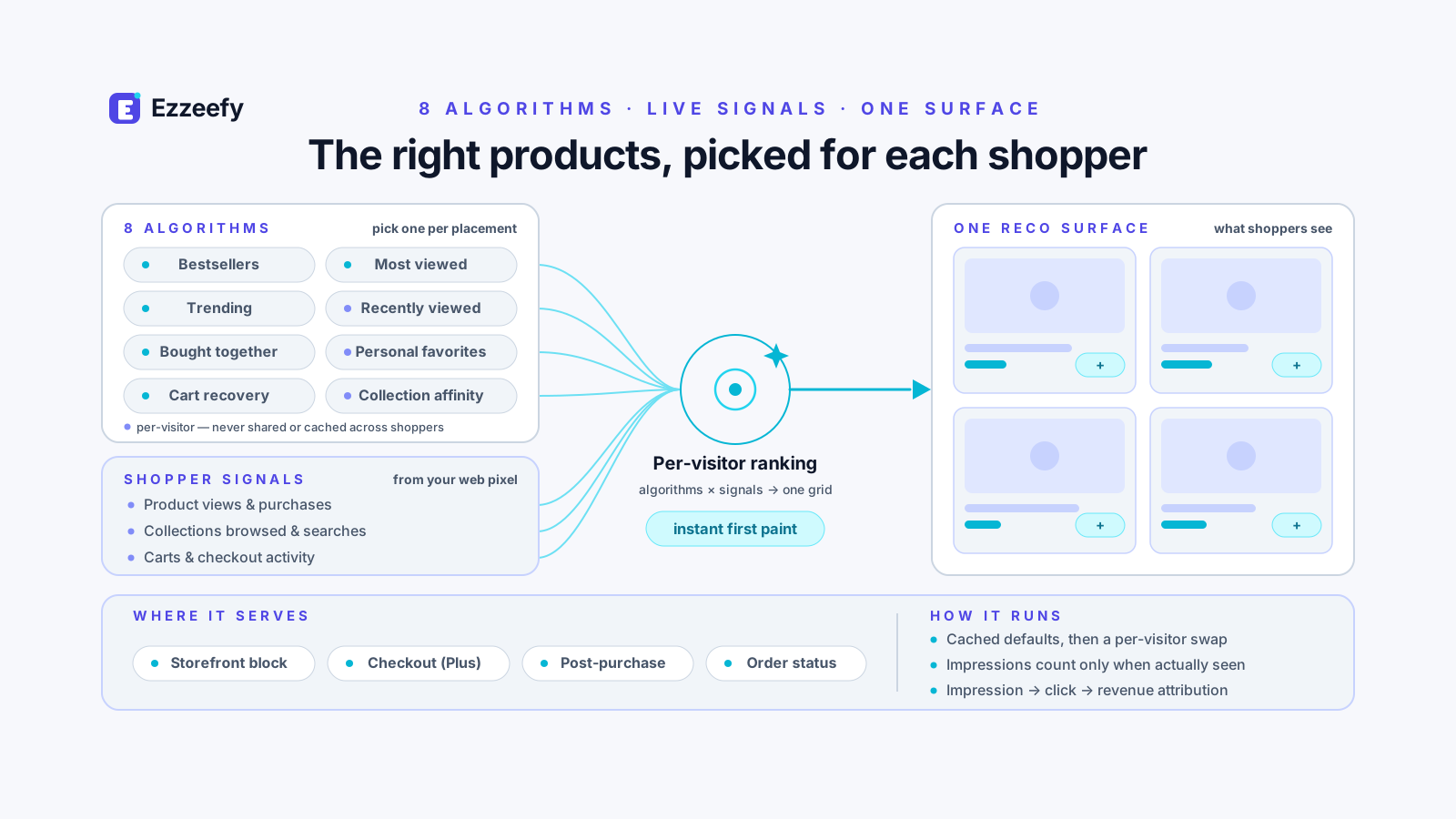
Insert content before or after any theme section, or replace the text, image and link fields inside one. Ezzeefy reads your real theme files, so the choices are your actual sections.
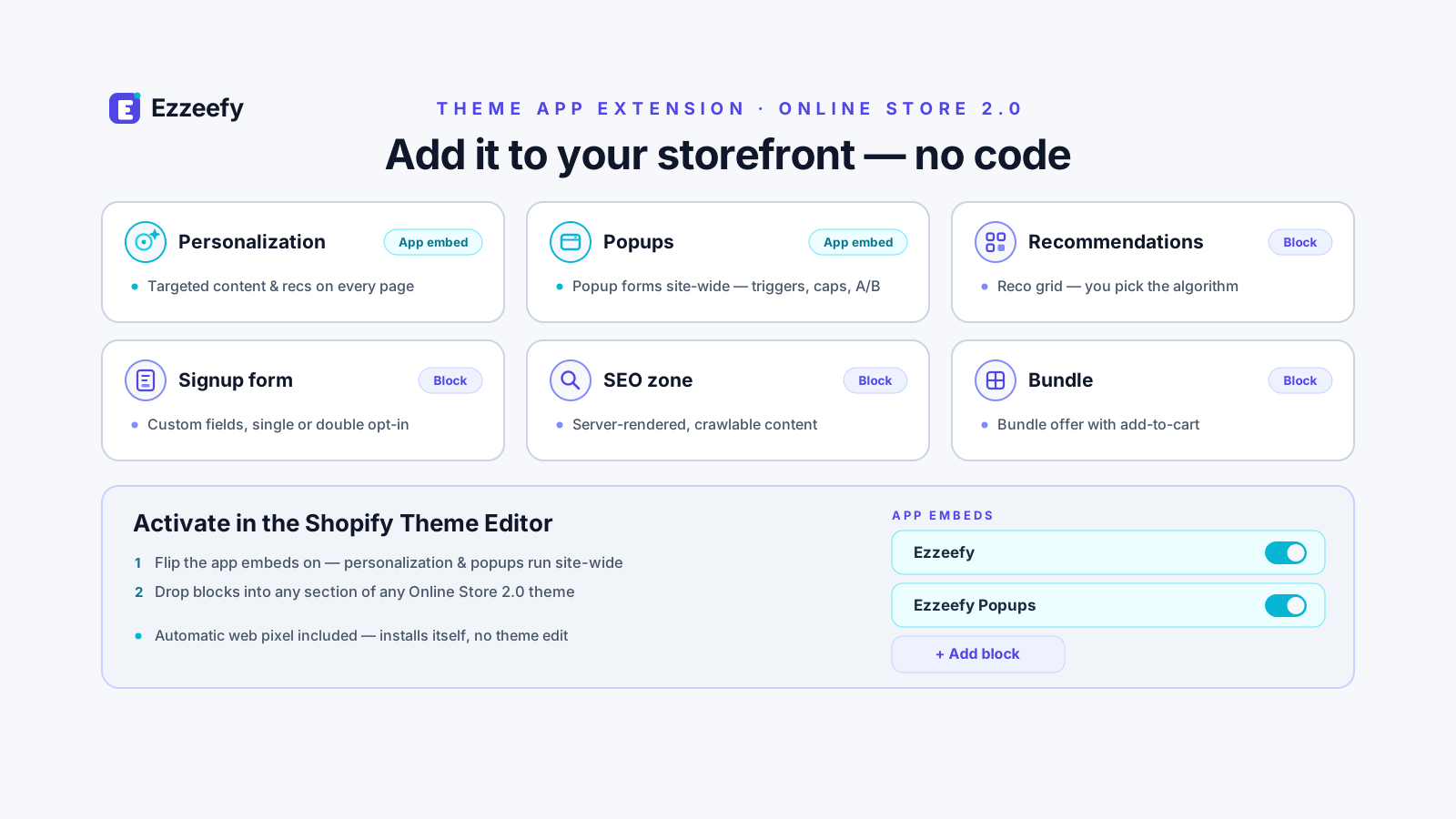
Requires: The Ezzeefy app embed switched on in your theme editor
Eight algorithms plus manual curation. Shop-wide: most viewed, bestsellers, trending, bought together. Per-shopper: recently viewed, favourites, cart recovery, collection affinity.
Popups, slide-ins and banners triggered on page load, exit intent, scroll depth, a time delay or cart value.
Customer fields, RFM tier, predictive scores, pages and sessions, cart value and abandonment, products and collections viewed, searches, referrer and days since last visit. The behavioural ones work for anonymous visitors too.
Hold back a percentage of shoppers who see nothing, and measure the difference. It answers whether personalization earned anything, not just which variant won.
Shift traffic toward whichever experience is performing best, instead of splitting it evenly and waiting.
A block for SEO-critical spots that renders your fallback content server-side, then swaps in the personalized version in the browser. Crawlers that run JavaScript see the personalized copy; those that do not see the fallback.
Requires: Adding the block to a section and writing the fallback
journeys
Campaigns and automations built on the same customer data, so who receives what follows from behaviour rather than a static list.
Build, schedule and send to a segment, with opens, clicks, bounces and revenue attributed back.
Requires: Verifying your sending domain with DNS records first
The same, with delivery tracking and automatic STOP handling. Numbers with no recorded consent are skipped rather than messaged.
Requires: Registering a sender number, which involves a carrier review
Multi-step automations with waits, branches and conditions — welcome, abandoned cart, win-back, post-purchase. Waits survive for days without drift or duplicate sends.
Rules on any customer field, RFM tier, predictive score or browsing behaviour, nested with and, or and not. Membership updates off order and customer activity rather than waiting for a nightly pass.
Issue native Shopify store credit by hand, in bulk to a segment, or automatically from a journey step.
Requires: New customer accounts, for shoppers to redeem at checkout
Generate a unique single-use code per customer inside a journey, or a pool for a campaign. Every code is generated fresh, so no two customers share terms.
A hosted page where customers pick channels and topics instead of only unsubscribing, linked from every marketing email.
Cap how many messages one person can get in a window across email and SMS together, and mute a nightly window in their own timezone.
Deliver each email at the hour that recipient is most likely to open it, in their timezone.
Require a second person to sign off a campaign before it can go out.
shopify functions
Seven rules that run inside Shopify's own checkout. You configure them in Ezzeefy; Shopify enforces them.
Automatic discounts that apply only to a chosen segment or loyalty tier, on products, subtotal or shipping.
Requires: Segment membership reaches checkout nightly, so it can be up to a day behind
Sell a kit as one product that expands into its components in the cart, with optional per-component pricing.
Requires: Checkout Extensibility — classic checkout is not supported
Hide or rename shipping options based on cart total, country, loyalty tier or segment.
Hide payment methods on the same conditions. Renaming works for standard methods; Shopify does not allow wallets like Shop Pay to be renamed.
Block checkout on your rules: minimum or maximum quantities, blocked countries, a required PO number, or a segment-specific minimum order value.
Rank which location fulfils an order using a priority you set per location.
Keep items from the same vendor fulfilling together instead of splitting across locations.
Requires: Set up entirely in Shopify's own order routing settings and product metafields — there is nothing to configure in Ezzeefy
forms
A form builder and a popup builder that feed the same consent records, segments and journeys as everything else.
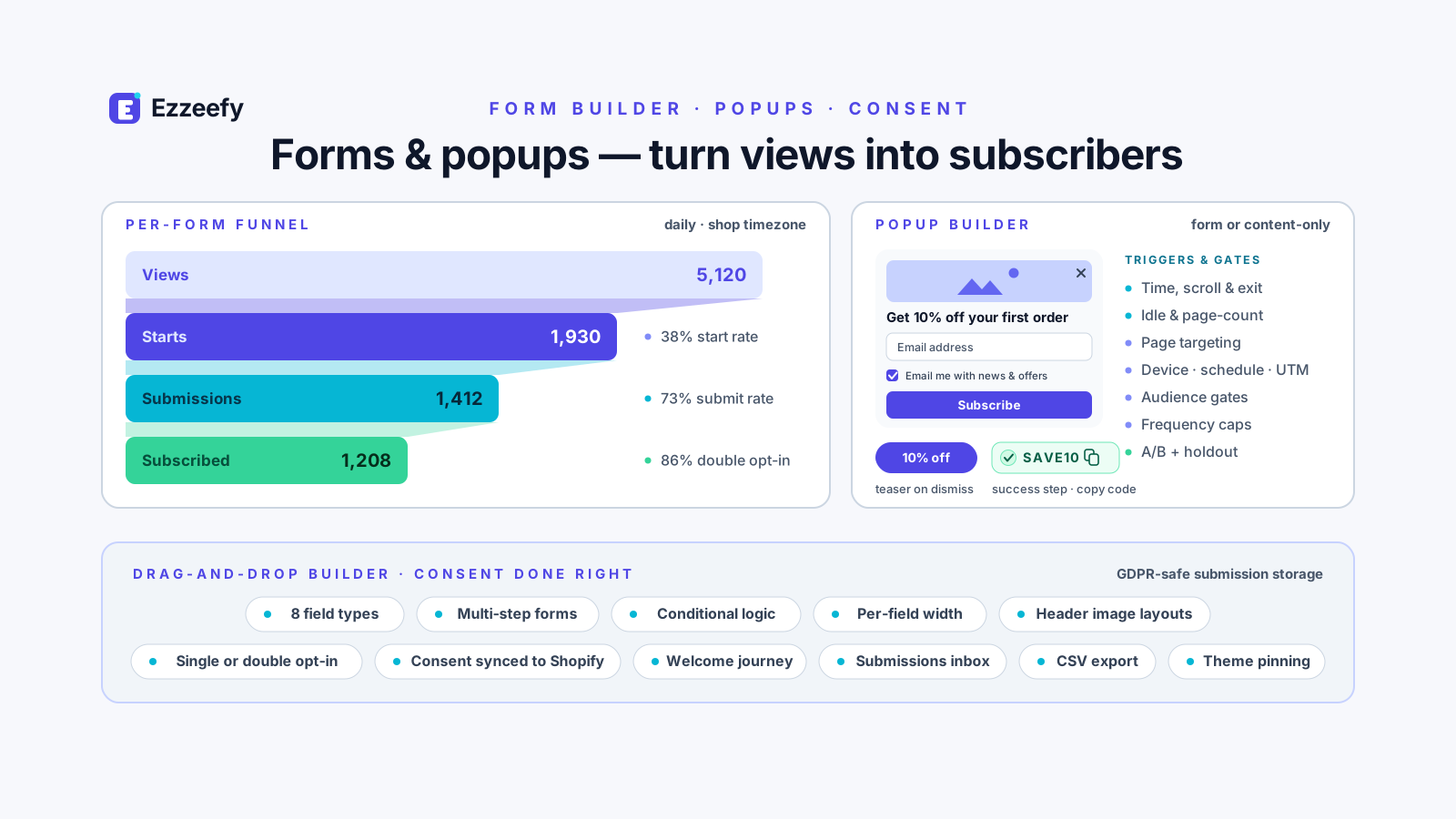
Custom fields — text, email, phone, select, radio, checkbox, date, number, consent — reordered by dragging, with a live preview.
Requires: Adding the form block to a theme section and pasting in the form ID
Serve any form as a popup site-wide, or a content-only promo. Delay, scroll and exit-intent triggers, frequency caps, page and device targeting, and a mobile bottom sheet.
Requires: The Ezzeefy Popups app embed switched on
Collect email or SMS consent with optional double opt-in. A confirmed subscriber records consent, joins a segment, enters a welcome journey and syncs to Shopify.
Per-form submission lists with a column for every custom field, and CSV export.
store operations
The day-to-day admin surfaces, so switching between Ezzeefy and Shopify is not constant.
Fulfil, refund, cancel, capture and mark as paid, and edit line items and the shipping address on an existing order.
Create and edit products with pricing, SEO and collections. Build manual or rule-based collections.
Create and edit customers, with changes written to Shopify.
Adjust stock across multiple locations with reason codes.
Build draft orders, add tracking and notify, and process returns.
Create, edit, activate and delete discounts and gift cards.
Shopify Payments balance, payouts and disputes.
Tag, update and export at scale — up to 250,000 records — plus CSV customer import.
b2b
Companies, their locations and contacts, with pricing that differs from retail.
Create and manage companies, their locations, and the people at them with roles.
Per-location price lists, as a percentage off retail or fixed prices per variant.
Set terms per company, and link draft orders to a company.
extensions
Beyond its own pages, the app adds surfaces inside Shopify and on your storefront.
Customer, order and product pages in Shopify gain an Ezzeefy panel, plus quick tag actions and bulk tagging on a segment.
Three actions — bulk operation, personalized email, tag by segment — and four triggers: campaign completed, customer reached VIP, win-back identified, inventory low.
Loyalty tier and lifetime stats on the order index and profile, and recommendations on the order status page.
A recommendations block on the thank-you page.
A recommendations block inside checkout itself, rendering instantly then upgrading to the personalized list.
Before it works
None of them are hard, but two involve waiting on someone else, so they are worth starting early.
Personalization and popups are two separate toggles in your theme editor. Nothing renders on your storefront until they are on — this is the most common reason a store sees no effect.
Bulk email is blocked until DNS records are in place. It protects your deliverability, and it is not instant.
Carriers review SMS sender registrations. Expect a wait before the first message can go out.
Shopify shows the plan and rates and asks you to approve before anything is charged. You get a grace period from install.
Charges appear on Shopify's approval screen before you agree to anything.